


Mureka: AI Radio & Music Maker
4.72.11K Reviews
App Specs
- Version
- 1.50.0
- Updated On
- License
- Free
- Downloads
- 5,000,000+
- Developer
- Skywork AI Pte.Ltd.
- Categories
- Music & Audio
- Platform
- Android, iOS
Screenshots



 Analysis by AppCompare
I judge music-making apps less by the thrill of the first session than by whether I still have a reason to open them once the novelty wears off. Mureka - AI Song&Music Maker makes a lively first impression: it gives people who may not know where to begin a way into shaping a song, while leaving room to steer the result. In my view, its lasting value depends on treating the AI as a starting point rather than expecting it to make every creative decision for you.
Why the first session feels inviting
As a music and audio app from Skywork AI Pte.Ltd., Mureka puts song creation within reach of someone who has an idea but no studio routine. The early appeal is the short distance between choosing a musical direction and hearing material you can react to. Instead of staring at an empty project, I can use a generated suggestion as a prompt: keep what sparks something, change what does not, and learn by comparing the two.
That makes it especially approachable for casual creators, songwriters facing a blank page, or anyone who wants to try musical ideas without first learning a complex digital audio workstation. It is also a useful distinction from a conventional recording app. A recorder captures a performance, while a traditional workstation gives you detailed control but expects you to supply more of the musical structure. Mureka’s appeal is that it helps bridge that gap.
Turning a generated idea into your own
The most useful way I found to approach AI-generated music is as a sketch, not a finished answer. If a suggested melody has one memorable turn, I can focus on that rather than accepting the entire arrangement as fixed. Changing only a few elements at a time also makes it easier to hear what improved the idea. This small habit can make experimentation feel purposeful instead of like cycling through options at random.
For instance, I might begin with a broad mood in mind, listen to the suggested musical material, and then decide what the song is missing: a stronger hook, a calmer passage, or a different rhythmic feel. That kind of judgment is still mine to make. The app can help get ideas moving, but a personal point of view is what stops a track from feeling like a generic exercise.
Where it fits into a normal week
A realistic use is a songwriter opening the app during a spare moment, testing a chorus idea, and saving the most promising direction to revisit later. Another is making a short musical backdrop for a personal video or a social post, where a quick original sketch is more appealing than searching through stock tracks. These are situations where speed and experimentation matter more than having every production control available.
I would be more cautious about making it the centre of a serious release workflow. If a project depends on detailed arrangement, precise editing, or a consistent production process, a full desktop workstation may be a better home for the work. Mureka can help generate a starting point, but creators who need complete control should check that its current tools and export options fit their exact workflow before building a project around it.
Worth Reading Before You Choose

Flipboard Shows What News Apps Must Do Beyond the Feed

Switching to Android Auto Means Rethinking Your Driving Routine

Google Calendar Makes a Crowded Week Easier to Manage

Ludo King Makes the Most of the Minutes Between Plans

Baby Panda World Brings Quick Play to Modern Phones, but Its Game Library Feels Busy

ESPN’s Live Game View Makes Following Close Games Easier
Keeping it useful after the novelty
The first burst of curiosity can carry an app for a few days; a habit needs a repeatable reason to return. I would use Mureka for specific creative tasks—trying a new direction, getting past a blank page, or exploring a melody—rather than opening it without a goal and hoping inspiration appears. That approach also helps me notice whether the results are genuinely useful or simply entertaining to generate.
It is worth saving the ideas that have potential and keeping notes about what you changed and why. A small record of decisions can make the next session more productive, especially when several variations sound appealing at first. It also gives you a way to develop a personal taste instead of letting the AI’s first suggestion set the boundaries of every song.
The trade-offs to keep in mind
AI assistance is valuable when it reduces the friction of starting, but it can also make a creator less patient with the slower work of shaping a song. If I accept a suggestion just because it arrives quickly, I may end up with material that is polished enough to enjoy but not distinctive enough to remember. The better trade-off is to use generation for momentum and then spend attention on the choices that make the track feel like mine.
There is also a practical question of fit. Someone who mainly wants to record an instrument, edit a detailed multitrack arrangement, or work with a familiar production setup may prefer a conventional recording or DAW app. Someone who wants to explore song ideas with AI help is more likely to appreciate Mureka. The difference is not simply beginner versus expert; it is whether you want the app to help invent material or to give you a precise workspace for material you already know how to build.
Getting Started with Mureka
Diving into Mureka - AI Song&Music Maker is as easy as pie. The app is available for both Android and iOS, so you’re covered regardless of your device preference. Once you download and open it, you’re greeted with a sleek and friendly interface. It’s a bit like stepping into a digital music studio, but without all the intimidating knobs and dials.
First things first, the app guides you through a quick tutorial. It’s pretty handy, especially if you’re a newbie. The tutorial covers the basics of creating a track, using different instruments, and even some nifty tips to enhance your music. I found it super helpful for getting the ball rolling.
The Creative Process
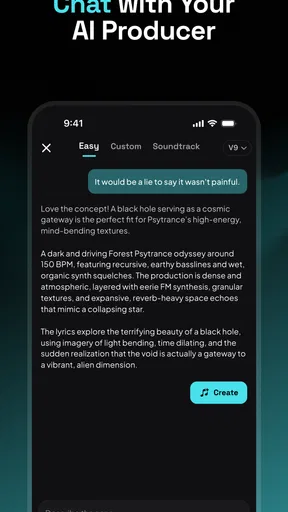
One of the standout features of Mureka is its AI-powered assistance. This isn’t just another gimmick; the AI genuinely helps in crafting melodies and beats that sound professional. You start by selecting the type of music you want to create – from pop to jazz, the choices are quite diverse. The AI then suggests chord progressions and melodies to match your selection.
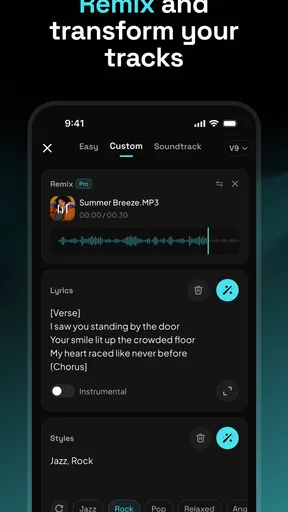
But don’t worry, you’re not just a passive observer. The app encourages creativity by allowing you to tweak and modify these suggestions to suit your personal style. I spent hours just experimenting with different sounds and beats. It’s like being in a candy store of music possibilities!
Instrument Variety and Sound Quality
Mureka really shines when it comes to the variety of instruments available. You can choose from a wide range of virtual instruments, each with its unique sound and character. The sound quality is top-notch, which is crucial for any music app worth its salt. I was particularly impressed with the acoustic guitar and piano sounds—they’re crisp and realistic.
The app also supports MIDI input, so if you’re someone who prefers using external instruments, you’re in luck. Connecting my MIDI keyboard was a breeze, and it added another layer of depth to my music creation process. It’s these little details that make Mureka a joy to use.
Sharing Your Masterpiece
Once you’ve created your track, it’s time to share it with the world. Mureka makes this process seamless. You can export your tracks in various formats, including WAV and MP3. Plus, there’s a direct share option to upload your music to social media or music platforms. I shared my first track on Instagram, and the feedback was overwhelmingly positive!
If you’re a budding artist looking to get your music heard, this feature is a game-changer. It takes the hassle out of file conversions and uploads, letting you focus more on what you love—creating music.
Room for Improvement?
Of course, no app is perfect, and Mureka does have a few areas where it could improve. While the AI suggestions are great, they can sometimes feel a bit repetitive. A few more unique options would be a welcome addition. Also, the app could benefit from more advanced editing features for those who want to fine-tune their tracks.
Another potential pitfall is the app’s subscription model. While there’s a free version, accessing the full range of features requires a subscription. It’s a small price to pay for the features offered, but some might find it a bit steep.
Can it earn a regular place on your phone?
For me, the answer depends on whether I have recurring reasons to make music. A casual user might enjoy a burst of experimentation and then leave the app untouched; a songwriter, hobbyist, or social creator can return whenever a new idea needs a quick sketch. Its lasting value is strongest when it supports a real creative routine, not when it is expected to produce endless novelty on demand.
Before committing to a paid tier, I would spend time with the free version and identify the tasks I actually repeat. The app is free to install, while in-app purchases range from $0.99 to $299.99 per item, so it is sensible to check the purchase details in the app and decide whether a paid option solves a need you have. Its audience rating is 4.8 from around 123,000 ratings, and it has passed one million installs, but popularity alone cannot tell you whether its workflow suits your habits.
What to check before building a project around it
If your plan involves sharing work, try the full path with a small test piece before investing hours in a larger one. Listen to the result outside the creation screen, confirm that the export works for the place you want to use it, and keep a copy of important drafts. This is a practical safeguard for any music-making workflow, especially when moving between a phone app and other tools.
Likewise, test the way you prefer to create. If you already play a MIDI keyboard, see whether using it feels natural for your ideas; if you work by ear or by choosing prompts, notice whether editing the suggestions gives you enough control. A feature can sound impressive in principle but matter little if it does not fit the way you make decisions.
The app is rated for Everyone, runs on Android 7.0 or later, and its current version is 1.22.0. Those details make it easier to judge basic compatibility, but the more important question is still whether the creative process feels comfortable on your particular device and whether the tools match the kind of music you want to make.
Final Thoughts
Overall, Mureka - AI Song&Music Maker is a fantastic tool for anyone interested in music creation. Its intuitive interface, coupled with AI assistance, makes it accessible for beginners while still offering enough depth for more experienced users. The sound quality and instrument variety are impressive, and the sharing options add a nice touch.
Whether you’re creating music for fun or pursuing it as a career, Mureka provides a solid platform to explore and grow your musical talents. So, why not give it a whirl? You might just discover your inner musician waiting to break free.
My long-term verdict
Mureka is easiest to recommend to people who want to experiment, overcome a blank page, or turn a passing musical thought into something they can hear and refine. It is less compelling for someone who needs a highly controlled production environment or who expects the AI to deliver a finished, individual-sounding song without much personal editing. I would keep it around if I were using it as a sketchbook with a purpose; I would skip it if I only wanted a conventional recorder or a full-featured workstation.
That is what decides whether the initial fun lasts: not how many ideas the app can produce, but whether it helps you make choices you would not have reached as quickly on your own. Used that way, it can be a handy creative companion. Used as a substitute for taste, practice, or detailed production control, its limitations become much easier to notice.
Pros
- User-friendly interface for music creation.
- Wide range of AI-generated music styles.
- High-quality sound output.
- Quick processing and song creation.
- Seamless integration with social media.
Cons
- Limited free version features.
- Requires internet for full functionality.
- Occasional AI-generated glitches.
- Subscription cost can be high.
- Lacks advanced editing tools.
FAQs for Mureka: AI Radio & Music Maker
What is Mureka - AI Song&Music Maker?
Mureka - AI Song&Music Maker is a cutting-edge application designed to assist users in composing and producing music using artificial intelligence. It offers a range of features that allow users to create original songs effortlessly, whether they are beginners or experienced musicians looking to enhance their creativity.
How does the AI technology in Mureka enhance music creation?
Mureka leverages advanced AI algorithms to analyze musical patterns and generate unique compositions. The app can suggest melodies, harmonies, and rhythms based on user preferences or inputs, providing a collaborative experience that helps users overcome creative blocks and explore new musical ideas.
Is Mureka suitable for beginners in music production?
Yes, Mureka is designed to be user-friendly, making it accessible for beginners. The intuitive interface guides users through the music creation process, offering tutorials and tips. Even those without prior music production experience can quickly learn to create songs with the help of AI-driven insights and tools.
What are the key features of Mureka - AI Song&Music Maker?
Mureka includes features such as AI-generated melody and harmony suggestions, customizable instrument sounds, beat creation, and real-time collaboration. The app also offers cloud storage, allowing users to save and access their projects anytime. Additionally, it supports exporting to popular audio formats for easy sharing and distribution.
Are there any subscription costs associated with Mureka?
Mureka offers a free version with basic features and several subscription tiers for more advanced functionalities. These may include additional AI tools, an expanded library of sounds, and premium support. Users can choose a plan that best suits their needs and budget, ensuring flexibility and value for money.


